
Why Claude Says "Usage Limit Reached" (And How to Fix It)
Ready to transform your data strategy with cutting-edge solutions?
Personal notes
TL;DR
Claude has two separate usage limits, a rolling 5-hour session limit and a fixed weekly limit, and you can be locked out by either one even if the other looks fine.
The night I got hit hardest, my session was only at 6% but my weekly limit was at 84%, so waiting out the session reset did nothing. The real culprit was that every session I'd run in the previous 24 hours was carrying more than 150,000 tokens of context, which burns through the weekly allowance much faster.
Covers: session limit vs. weekly limit, how the reset actually works, whether a teammate can drain your quota, and what "100% of usage was at >150k context" means.
Usually when I'm working with Claude I get hit by the same error: "your maximum limit has reached and will be reset in 5 hours." I'd seen it a hundred times and just felt tired every time, but I never actually stopped to ask what was happening underneath it.
Then last night it actually mattered. It was around 8:10 PM, I had a delivery due the next day, and it wasn't one thing I needed from Claude, it was a bunch of different artifacts I was depending on it for. And right in the middle of that, this banner kept showing up:

The banner that kept interrupting me mid-delivery, 83% of my weekly limit, resetting in 18 hours.
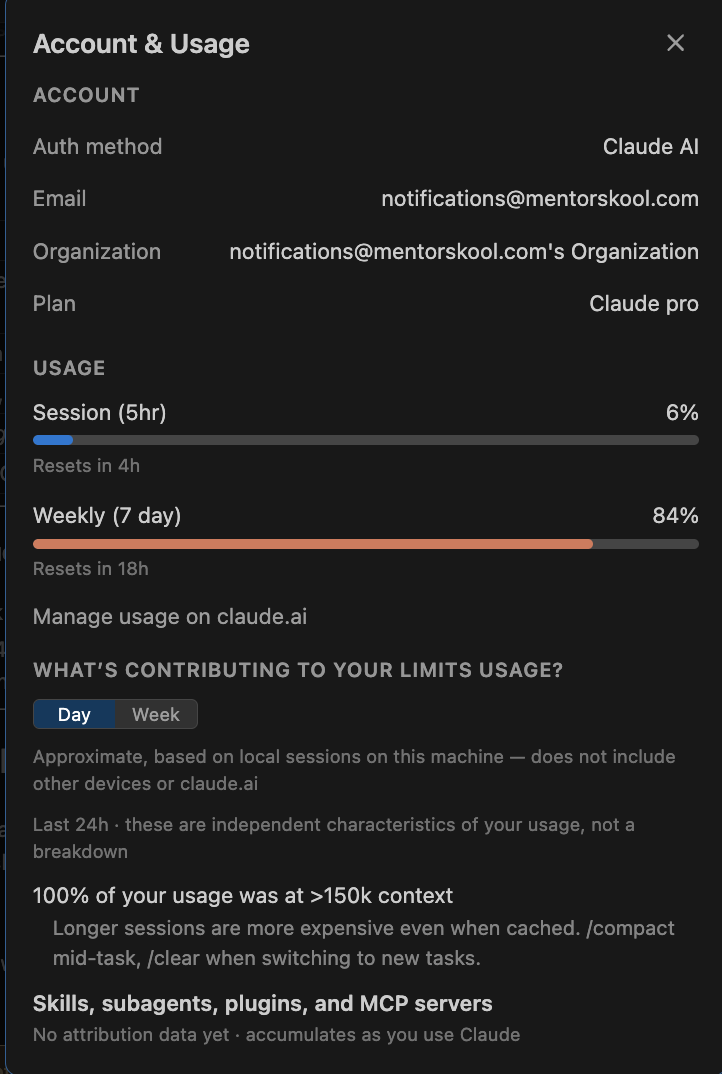
So this time I actually clicked "View Usage" instead of just closing it, and this is what opened up.
Session was sitting at 6%. Weekly was at 84%. That gap is what sent me down this whole rabbit hole.
There are two limits, not one
What's the difference between the session limit and the weekly limit?
The session limit resets on a rolling 5-hour window, while the weekly limit resets on a fixed 7-day cycle tied to your account, and both have to be under 100% for you to keep working. Say you start using Claude at 3:31 PM. That 5-hour window starts ticking from your first message and rolls forward from there, so if you burn through 100% of it in the first 40-odd minutes, you're sitting idle for the rest of those 5 hours. The weekly limit works differently: it doesn't reset on Sunday or Monday for everyone, it resets at a fixed time tied to your specific account, whatever day you originally subscribed on. Once you hit 100% of it, whether that's day 1 of your week or day 6, you're locked out until your personal weekly anchor comes around.
Limit | Window | Resets |
|---|---|---|
Session | Rolling 5 hours | Exactly 5 hours after your first message in that window |
Weekly | Fixed 7 days | At a fixed anchor time tied to your account, not a calendar week |
If my session limit resets, does that mean I can use Claude again?
Not necessarily. Session and weekly limits are checked together, not one or the other. If your weekly limit is still at 100%, you're locked out even if your 5-hour session just reset. That's exactly what happened to me: session was only at 6%, but weekly was at 84%, so the weekly limit was the one actually keeping me out.
The weekly reset is on your own clock, not a shared one
My screenshot said "resets in 18h," which means my personal weekly anchor was roughly 18 hours out from the moment I took that screenshot. That's genuinely account-specific, not tied to any day of the week.
Worth being honest about this part: this is the official framing Anthropic gives, but it's also the most argued-about detail online. Anthropic's own docs don't spell out the exact mechanism, and there's a fair amount of chatter in the community about weekly resets sometimes landing early or a bit inconsistently, occasionally because Anthropic pushes a global reset for everyone rather than your personal one. So I'd treat "18h" as what your account happens to be showing right now, not something guaranteed down to the minute.
Whether a teammate can drain your quota depends entirely on your plan
Can someone else on my team use up my Claude limit?
On an Individual Pro plan or a seat-based Team or Enterprise plan, your usage pool is yours alone, and a teammate maxing out their own usage doesn't touch your quota. The one real exception is usage-based Enterprise, the pay-as-you-go org contracts, where the consumption pool is shared across everyone in the org. On those contracts, some surfaces, particularly Claude Code and Cowork, burn through tokens at a noticeably higher rate than standard chat, so a heavy user can genuinely eat into what's available for the org. Even there though, it shows up as spend, not as a hard per-person cap suddenly running out.
Plan type | Is usage shared? |
|---|---|
Individual Pro | No, your usage is yours alone |
Team or seat-based Enterprise | No, each person has their own independent pool |
Usage-based Enterprise (pay-as-you-go) | Yes, the org's pool is shared across all users |
Does a teammate maxing out their Claude usage shrink mine?
On an Individual Pro plan or a seat-based Team/Enterprise plan, no. Each person has their own independent usage pool. The only exception is a usage-based, pay-as-you-go Enterprise contract, where the whole org shares one consumption pool.
"100% of usage was at >150k context" is a warning, not a limit
This line isn't a limit by itself, it's a diagnostic note telling you that every session you ran in the last 24 hours was carrying more than roughly 150,000 tokens of context before you even sent your next message. That context includes your conversation history, files that got read, any CLAUDE.md content, and tool outputs. Above roughly 150k tokens, every turn costs more even with caching, because reprocessing a large prefix is just more expensive than reprocessing a small one.
That's exactly why my weekly allowance drained so fast on delivery night. I had long sessions running back to back across all those different artifacts, and none of them got cleared. Each new artifact request was riding on top of everything that came before it instead of starting fresh, so the cost kept compounding.
The fix it's pointing you toward is using /compact mid-task to shrink the history while keeping the thread alive, and /clear when you're genuinely switching to a new task, so you start from a clean, cheap context instead of dragging the old one along.
What does ">150k context" mean in Claude's usage view?
It means every session in the last 24 hours carried more than roughly 150,000 tokens of context, including conversation history, files read, and tool outputs, before the next message was even sent. Past that threshold, each turn costs more to process, which drains your weekly allowance faster.
Knowing why it happened doesn't fix it yet
That's the full picture of what's actually happening behind the "limit reached" error: two separate limits that both have to be clear, a weekly reset that's on your own clock, quota that's genuinely shared only on usage-based Enterprise plans, and a context warning that quietly compounds if you never clear or compact your sessions.
Understanding it is one thing. Actually fixing how I work so I don't end up here again at 8 PM the night before a delivery is a different problem, and that's what I'm going to get into next.
Quick reference glossary
Session limit — A rolling 5-hour usage window that starts with your first message and resets exactly 5 hours later, independent of the weekly limit.
Weekly limit — A usage cap on a fixed 7-day cycle, tied to a personal reset anchor on your account rather than a calendar week.
Usage-based Enterprise — A pay-as-you-go org contract where the entire organisation shares one consumption pool, unlike Individual Pro or seat-based Team/Enterprise plans.
Context — Everything Claude is carrying into a given turn: conversation history, files read, CLAUDE.md content, and tool outputs, measured in tokens.
/compact — A command that shrinks a session's context while keeping the working thread intact.
/clear — A command that wipes the session context entirely, used when starting a genuinely new task.
Ready to Experience the Future of Data?
You Might Also Like
Discover how Databricks Genie Code replaces reactive coding assistants with autonomous, multi-step data engineering execution. This guide covers Lakeflow pipeline monitoring, strict Unity Catalog governance, and the new 150 free DBU/month tier for data teams.
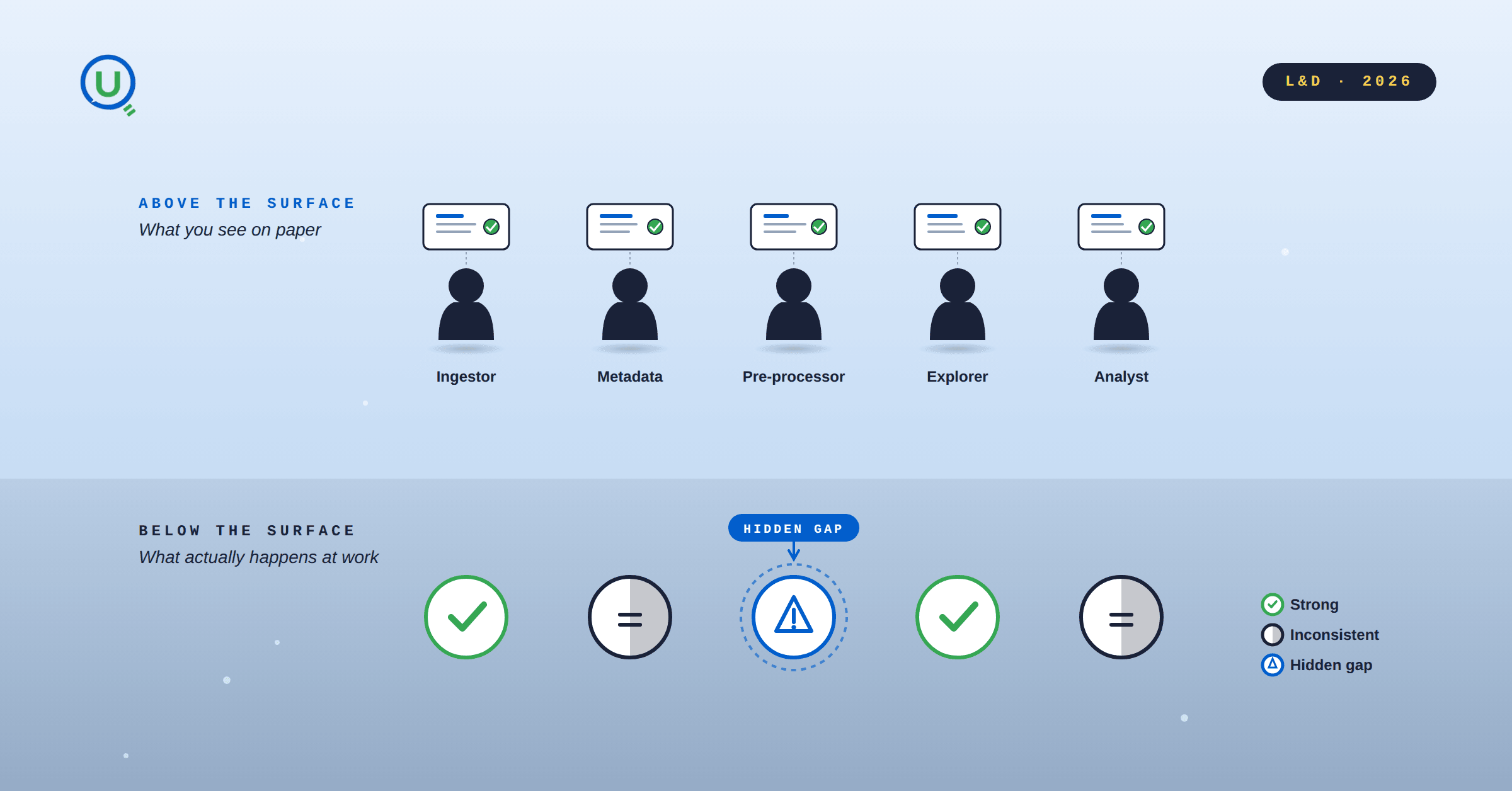
Skill gaps in data teams rarely show up in surveys or certifications. They show up when someone calls pd.read_csv on a .xlsx file. Three methods to make competence observable, not self-reported.
Spark optimization isn't always complex; some tweaks have a huge impact. Inferring schemas forces Spark to scan your data twice, slowing ingestion and inflating cost. Explicit schemas avoid the extra pass and make pipelines faster and cheaper.

A practical walkthrough of how I reduced heavy batch workloads using Change Data Feed (CDF) in Databricks. This blog shows how CDF helps process only updated records, cutting compute costs and boosting pipeline efficiency.

Why DELETE isn’t enough under GDPR, and how Time Travel can make sensitive data reappear unless VACUUM is used correctly.

A complete guide to building a future-ready L&D team in 2025. Explore the roles, skills, structure, and AI-driven strategies that drive real business impact.

Learn how to bridge the digital skills gap with effective upskilling strategies. Discover how to foster a culture of continuous learning, personalize training with AI, and focus on future-ready skills.

Discover 5 key strategies to overcome upskilling and reskilling challenges in the age of AI. Learn how to build a future-ready workforce with personalized learning, cross-functional collaboration, and real-world application.
Explore the key differences between LXP and LMS platforms and learn which is best for your business in 2025. Discover how AI-driven learning systems can boost employee engagement and upskill your workforce for the future.

Discover 6 powerful ways to upskill employees and future-proof your workforce in the age of AI and data. Learn how leading organizations are adapting learning strategies to stay ahead.
Explore the difference between reskilling and upskilling and why it matters for career growth and organizational success. Learn how reskilling helps workers pivot to new roles and how upskilling enhances current skills to stay competitive in today's fast-changing job market.

Explore the 6 core adult learning principles and how they can transform your training programs. Learn how to apply these principles for better engagement, retention, and real-world application, ensuring meaningful learning experiences for adult learners.

Discover the 9 key components of an effective learning experience and how they drive better engagement, retention, and real-world application. Learn how organizations can implement these elements to create impactful learning journeys.

Boost your Business Intelligence skills in 2025 with 25 hands-on exercises that cover data analysis, visualization, SQL, and more. Perfect for professionals looking to sharpen their BI expertise and stay ahead in the competitive job market.

Learn about Learning Management Systems (LMS), their key benefits, and popular examples like Moodle, Google Classroom, and Enqurious. Discover how LMS platforms are revolutionizing education and training for businesses and schools.

Discover how AI is transforming workplace learning and development by personalizing training, delivering real-time feedback, and aligning learning with business goals to drive workforce excellence and growth.

Discover why a Capstone Project is essential in 2025. Explore how it bridges the gap between theory and practice, enhances problem-solving skills, provides industry experience, and prepares students for real-world challenges. Learn how capstone projects are shaping future careers.

In today’s rapidly evolving job market, the value of evidence-based skills has never been more critical. As industries shift and technology transforms how we work, the need for tangible proof of competencies has become paramount.

In today’s rapidly evolving technological landscape, one skill stands out above all others: learnability. Learnability, often described as the ability to continuously acquire new skills and adapt to change, is no longer just an advantage but a necessity.

To build a future-ready workforce, companies need to rethink talent strategies. Start by developing a data-driven talent system to align key roles with best-fit talent. Invest in AI training now to stay ahead, and shift hiring practices to focus on skills, not just job titles.

At Enqurious, we understand the importance of empowering workforces with the right skills to navigate emerging challenges. Enqurious works as a strategic partner to supplement and enhance L&D Teams.

Understanding how variables work together can supercharge your marketing strategy.

Marketing Effectiveness: Strategies, Channels, and ROI Maximization

The transformative journey of the energy sector: from outdated practices to a data-driven revolution.

Enhancing Readability for Effective Learning and Development
This guide helps to understand what elements come together to make or break a visual

Thoughtfully crafted instruction design with drops of ambiguity and room for creative thinking makes the learning experience more enjoyable and “real world”.

Even after putting the best of the content, infrastructure and people, the gap between the intention of organizations to foster a culture of learning and the actual implementation and adoption of learning initiatives by employees keeps on widening.

Understanding why it is so important to nurture self driven learners in a fast paced technology world

Leveraging data to design better and efficient L&D strategy for organization success